mysql2puml
1. Help
Command: bin/mysql2puml --help
SYNOPSIS:
    Converts mysql dump sql schema to plantuml format.

USAGE: mysql2puml [OPTIONS] [ARGUMENTS]
USAGE: mysql2puml [--help|-h] [--config]
  [--bash-framework-config <bash-framework-config>] [--verbose|-v] [-vv] [-vvv]
  [--log-level <log-level>] [--log-file <log-file>]
  [--display-level <display-level>] [--no-color] [--theme <theme>] [--version]
  [--quiet|-q] [--skin <skin>]

ARGUMENTS:
  [sqlFile {single}]    Sql filepath to parse (read from stdin if not provided).

GLOBAL OPTIONS:
  --help, -h {single}
    Displays this command help
  --config {single}
    Displays configuration
  --bash-framework-config <bash-framework-config> {single}
    Use alternate bash framework configuration.
  --verbose, -v {single}
    Info level verbose mode (alias of --display-level INFO)
  -vv {single}
    Debug level verbose mode (alias of --display-level DEBUG)
  -vvv {single}
    Trace level verbose mode (alias of --display-level TRACE)
  --log-level <log-level> {single}
    Set log level
    Possible values:
      - OFF
      - ERR
      - ERROR
      - WARN
      - WARNING
      - INFO
      - DEBUG
      - TRACE
    Default value: OFF
  --log-file <log-file> {single}
    Set log file
    Default value: /logs/bash.log
  --display-level <display-level> {single}
    Set display level
    Possible values:
      - OFF
      - ERR
      - ERROR
      - WARN
      - WARNING
      - INFO
      - DEBUG
      - TRACE
    Default value: INFO
  --no-color {single}
    Produce monochrome output. alias of --theme noColor.
  --theme <theme> {single}
    Choose color theme - default-force means colors will be produced even if
    command is piped.
    Possible values:
      - default
      - default-force
      - noColor
    Default value: default
  --version {single}
    Print version information and quit.
  --quiet, -q {single}
    Quiet mode, doesn't display any output.

OPTIONS:
  --skin <skin> {single}
    Header configuration of the plantuml file.
    Default value: default


DESCRIPTION:
EXAMPLE 1:
mysql2puml dump.dql

EXAMPLE 2:
mysqldump --skip-add-drop-table \
  --skip-add-locks \
  --skip-disable-keys \
  --skip-set-charset \
  --user=root \
  --password=root \
  --no-data skills | mysql2puml

LIST OF AVAILABLE SKINS:
  - default

VERSION: 3.0

AUTHOR: [François Chastanet](https://github.com/fchastanet)

SOURCE FILE: https://github.com/fchastanet/bash-tools-framework/tree/master/src/_binaries/Converters/mysql2puml/mysql2puml-binary.yaml

LICENSE: MIT License
Copyright (c) 2021-now François Chastanet
2. Example
Mysql dump of some tables
mysqldump --skip-add-drop-table --skip-add-locks \
  --skip-disable-keys --skip-set-charset \
  --host=127.0.0.1 --port=3345 --user=root --password=root \
  --no-data skills \
  $(mysql --host=127.0.0.1 --port=3345 --user=root --password=root skills \
    -Bse "show tables like 'core\_%'") |
  grep -v '^\/\*![0-9]\{5\}.*\/;$' >doc/schema.sql
Transform mysql dump to plant uml format
mysql2puml \
  src/_binaries/Converters/testsData/mysql2puml.dump.sql \
  -s default >src/_binaries/Converters/testsData/mysql2puml.dump.puml
Plantuml diagram generated
@startuml
' uncomment the line below if you're using computer with a retina display
' skinparam dpi 300
!function Table($name)
  !return "class " + $name + " << (T,#FFAAAA) >>"
!endfunction
' we use bold for primary key
' green color for unique
' and underscore for not_null
!function column($name, $type, $null="", $pk="", $fk="", $unique="")
  !$label = ""

  ' Display key
  !if ($pk == "PK" && $fk != "FK")
    !$label = "<color:red><&key></color>"
  !elseif ($pk == "PK" && $fk == "FK")
    !$label = "<color:blue><&key></color>"
  !elseif ($fk == "FK")
    !$label = "<color:green><&key></color>"
  !else
    !$label = "<&minus>"
  !endif

  ' Display nullable icon
  !if ($null == "NULL")
    !$label = $label + "<&ban>"
  !else
    !$label = $label + "<&minus>"
  !endif

  ' Display unique icon
  !if ($unique == "UNIQUE")
    !$label = $label + "<&audio-spectrum>"
  !else
    !$label = $label + "<&minus>"
  !endif

  ' display label in the right color (PK, FK, both, none)
  !$label = $label + " "
  !$columnSpec = $name + " : " + $type
  !if ($pk == "PK" && $fk != "FK")
    !$label = $label + "<u><color:red>" + $columnSpec + "</color></u>"
  !elseif ($pk == "PK" && $fk == "FK")
    !$label = $label + "<u><color:blue>" + $columnSpec + "</color></u>"
  !elseif ($fk == "FK")
    !$label = $label + "<u><color:green>" + $columnSpec + "</color></u>"
  !else
    !$label = $label + $columnSpec
  !endif

  !return $label
!endfunction
' other tags available:
' <i></i>
' <back:COLOR></color>, where color is a color name or html color code
' (#FFAACC)
' see: http://plantuml.com/classes.html#More
hide methods
hide stereotypes
skinparam classAttributeIconSize 0

' entities
' entities
Table(customer) {
  column("id", "int11", "NOT NULL", "PK", "", "")
  column("identifier", "varchar128", "NOT NULL", "", "", "UNIQUE")
  column("created_at", "datetime6", "NOT NULL", "", "", "")
  column("updated_at", "datetime6", "NOT NULL", "", "", "")
}

Table(learner) {
  column("id", "int10 unsigned", "NOT NULL", "PK", "", "")
  column("customer_id", "int11", "NOT NULL", "", "", "UNIQUE")
  column("external_id", "varchar255", "NOT NULL", "", "", "UNIQUE")
  column("created_at", "datetime6", "NOT NULL", "", "", "")
  column("updated_at", "datetime6", "NOT NULL", "", "", "")
}
learner "0..*" --> "1" customer : "id"

Table(learner_attribute) {
  column("id", "int11", "NOT NULL", "PK", "", "")
  column("attribute_id", "int10 unsigned", "NOT NULL", "", "", "")
  column("learner_id", "int10 unsigned", "NOT NULL", "", "", "")
  column("created_at", "datetime6", "NOT NULL", "", "", "")
  column("interest", "double", "NOT NULL", "", "", "")
  column("level", "double", "NOT NULL", "", "", "")
  column("updated_at", "datetime6", "NOT NULL", "", "", "")
}
learner_attribute "0..*" --> "1" attribute : "id"
learner_attribute "0..*" --> "1" learner : "id"

Table(attribute) {
  column("id", "int10 unsigned", "NOT NULL", "PK", "", "")
  column("mapped_attribute_id", "int10 unsigned", "NULL", "", "", "")
  column("internal_id", "int11", "NULL", "", "", "UNIQUE")
  column("created_at", "datetime6", "NOT NULL", "", "", "")
  column("translations", "json", "NOT NULL", "", "", "")
  column("updated_at", "datetime6", "NOT NULL", "", "", "")
}
attribute "0..*" --> "1" attribute : "id"

Table(product) {
  column("id", "int10 unsigned", "NOT NULL", "PK", "", "")
  column("customer_id", "int11", "NOT NULL", "", "", "UNIQUE")
  column("external_id", "int10 unsigned", "NOT NULL", "", "", "UNIQUE")
  column("created_at", "datetime6", "NOT NULL", "", "", "")
  column("updated_at", "datetime6", "NOT NULL", "", "", "")
}
product "0..*" --> "1" customer : "id"

Table(product_attribute) {
  column("id", "int11", "NOT NULL", "PK", "", "")
  column("attribute_id", "int10 unsigned", "NOT NULL", "", "", "")
  column("training_course_id", "int10 unsigned", "NOT NULL", "", "", "")
  column("created_at", "datetime6", "NOT NULL", "", "", "")
  column("relevance", "double", "NOT NULL", "", "", "")
  column("updated_at", "datetime6", "NOT NULL", "", "", "")
}
product_attribute "0..*" --> "1" attribute : "id"
product_attribute "0..*" --> "1" product : "id"

@enduml
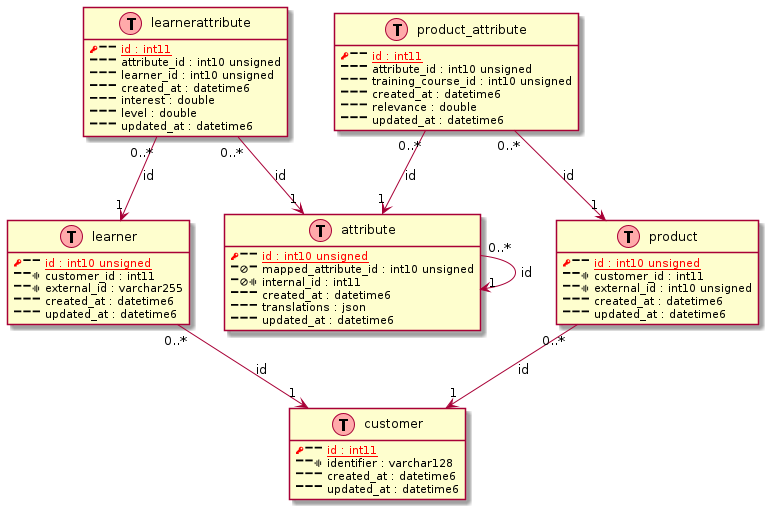
using plantuml software, here an example of resulting diagram
 Or, if you want, you can alternatively use the GitHub discussion Q&A for feedback and questions.